Friday, May 22, 2015

How To Research The Most Appropriate Keywords

Research The Most Appropriate Keywords
Choosing the right keywords for your blog is very important. If you choose the wrong keywords, then do not be surprised if your blog is empty of visitors. If your blog is empty of visitors, later the edges you will quit blogging. But hopefully by reading this post you are not going to stop blogging until it could get a lot of visitors.

What is Keyword Research?

Keyword research is to find keywords that are frequently typed by people in search engines according to your blog topic.

For example your blog discusses operating systems, then roughly what keywords are often used by people to search for information about the operating system in a search engine, whether it is "Review of Windows 8" or "Windows 10" or "Best Operating System" or the other.

Keyword research is one of a very important part in SEO strategy. For those of you who want to get visitors from search engines, then there is no reason not to conduct a search keyword. You can still get visitors from search engines without keyword research, but will not be maximized.

Keywords Type

Before you read this post any further, it's good to first understand some kinds of keywords in SEO techniques, keyword has many types. Some types of keyword are:
  • Short tail keyword
  • Long tail keyword
  • Timeless Keyword
  • Seasonal keyword 

In addition to the four types of keyword above I actually still an awful lot of others, but the most important thing to know is the four types above.

1. Short tail keyword

Short tail keyword is a keyword which generally consist of only one or two words only, for example:

Android
Smartphone
Cheap Android
Latest Smartphones

etc.

Type in keywords such as these usually have very high levels of competition. It is very difficult to be able to compete on a keyword like this unless you have a high level of SEO knowledge.

2. The Long tail keyword

Long tail keyword is a long version of the short tail keyword, for example:

A List Of The Coolest Android Smartphone
Best Samsung Android Smartphone
etc.

If you are still a beginner so long tail keyword is definitely more recommended since the level of competition which is likely to be lower and make it easy for you to master the top positions of search engines.

The shortcomings of the long tail keyword traffic is obtained not by as much as a short-tail keyword. In addition it is also quite difficult to find long tail keywords that are really good.

3. Timeless Keyword

Timeless Keyword is a keyword that always used people to search for information on a search engine and does not depend on time, for example:

How to convert cm to inches

These keyword including timeless Keywords because everyone will surely do the same calculations.

4. Seasonal keyword 

Seasonal keyword is the opposite of immutable keyword, the keyword that is seasonal or just popular for a moment, for example:

Wimbledon Champion 2015


How To Research Keywords

Now the question is, how to do keyword research?

Below I explain about how to conduct keyword research using Google Adwords: Keyword Tool Planner.
  • Go to Google Adword: Keyword Planner. 
  • If you are already registered then click Sign in button, if you haven't register click Create an account.
  • After going to the dashboard Keyword Planner, choose one of the 2 menu Find new keywords as you want, namely: search for new keywords using a phrase, website or category or the Multiply keyword lists to get new ideas.
  • The easy way is to use the first option.
  • Once the dialog box appears, enter the short tail keyword you want according to your topic, e.g. "Android"
  • Specify the targeting of country, language, date range and search engine (for while you ignore the other fields).
  • Click Get ideas, then the graph will appear, Ad group ideas and Keyword ideas. Select the Keyword ideas tab it will pop up list of keywords as shown below.
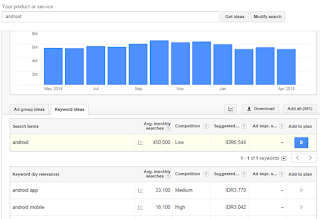
    Keyword Planner
  • After the keyword list appears, then the retrieved data is that you can learn and that you will use as a keyword?
  • In the list have provided data about Average monthly searches, Competition, Suggested bid and Ad impression share.
  • To facilitate the analysis of the keywords list, download the list simply by clicking the Download button, and then you select the CSV type and you can open the file with Excel.
Look for keywords with a high level of Average monthly searches but the level of Competition is low and Suggested bid (for google adsense) is high.
List about the level of competition that exists in the Google AdWords: Keyword Planner is an AdWords advertiser competition data, not a competition in the search engine Google.

For information about how to analyze the level of competition you can use browser Extensions like SEOQuake or MozBar.

If you use the Analyzer level competition tool, it can know the level of competition based on Pagerank, Alexa Rank, Index, etc. from the webs which appeared on the main page of the google search engine. Some of the tips that I can give, if you use the SEOQuake or MozBar is:
  • Do not choose a keyword that is controlled by the web authority, for example: Wikipedia
  • Do not choose a keyword that is controlled by the web with pagerank in the top 5
  • Do not choose a keyword that is controlled by the web with page authority and domain authority over 50.

How To Execute A Keyword

To perform a execution keyword into your article, you can read our article about How to Make SEO Friendly Articles, there will be explained in detail how to do it.

Getting Traffic with Giving Awards to Another Blog

Giving Awards to Another Blog

It occurred to me after reading a blog "blogingfunda" written by Mohinder Paul Verma, that it is important to reward the one who gave you the inspiration to write a blog so that you get satisfaction from the results you achieve. I think it can improve web traffic or blog naturally also, of course, with a few tricks which I will explain below.

How Come?

Try to imagine, how happy you are if your blog or your name (especially for beginner bloggers) featured in an article on the blogs of others. You will feel proud and of course you will automatically open that blog; and of course you would definitely try to share to your friends.


So What Next?

  • Look for blogs that inspire you to write a blog and really good quality; do not take high pagerank blog, because it is definitely too much comment author so your chances are ignored.
  • Take more than one blog that inspired you to be given an award by writing to your blog (tailored to the needs of your article topic).
  • If you already have a couple of blogs that became the inspiration for writing your blog, then intertwine network to the author to communicate with each other, so that it can make your friends to share.
  • Share any article in the blog to the blog author intended.
  • Exchanging article can also be done to get backlinks in a very simple.

It was five in my opinion to be able to get natural traffic by giving awards to the other blogs, and you can develop other ways without having a negative way; and I am very sure in this way will give a positive lesson to the reader so that the reader will appreciate you.

Good luck, those who have another opinion, I do not hesitate to discuss with you.

Sending email from Google Sheets (Google Drive)

Google Drive provides many facilities applications that can be used freely, as well as general file storage. One that has been often we use is Google Sheets. You can take advantage of this spreadsheet as a list to send emails automatically. If you already have a Gmail account, then you can directly access Google Drive here.

Sending Email Automatically

How the steps you have to do to send emails automatically from spreadsheets (Google Sheets)? very easily, you can follow the steps below:
  • Go to the Google Drive website.
  • Click New button, followed by the selection of Google Sheets.
    google sheet
  • Then write the data Email and Message as an example the following picture:
  • Then select Tools menu, then select Script editor sub menu.
  • Furthermore, after entering to form Script editor, copy and paste the following script:

function sendEmails() {
var sheet = SpreadsheetApp.getActiveSheet();
var startRow = 2; // First row of data to process
var numRows = 2; // Number of rows to process
// Fetch the range of cells A2:B3
var dataRange = sheet.getRange(startRow, 1, numRows, 2)
// Fetch values for each row in the Range.
var data = dataRange.getValues();
for (i in data) {
var row = data[i];
var emailAddress = row[0]; // First column
var message = row[1]; // Second column
var subject = "Sending emails from a Spreadsheet";
MailApp.sendEmail(emailAddress, subject, message);
}
}

  • After you paste the above script as shown in the figure below, save it by clicking Save button (Floppy Disk image).
  • Next run the script followed by selecting Run menu option sendEmails script.
  • Then the process will be executed and the confirmation will appear as shown below, select Continue and followed the next selection by clicking Accept button.

    google sheet email
    google sheet email
Then the process of sending email based on the data that you write in Google Sheets will automatically be sent. Good luck.

Monday, May 4, 2015

Tags and Styling Template

Moon Walker

Normal Paragraph


Ea eam labores imperdiet, apeirian democritum ei nam, doming neglegentur ad vis. Ne malorum ceteros feugait quo, ius ea liber offendit placerat, est habemus aliquyam legendos id. Eam no corpora maluisset definitiones, eam mucius malorum id. Quo ea idque commodo utroque, per ex eros etiam accumsan.

Paragraph Format

Et posse meliore definitiones (strong) his, vim tritani vulputate (italic) pertinacia at. Augue quaerendum (Acronym) te sea, ex sed sint invenire erroribus. Cu vel ceteros scripserit, te usu modus fabellas mediocritatem. In legere regione instructior eos. Ea repudiandae suscipiantur vim, vel partem labores ponderum in blogger templates (link).

Default KBD

To paste copied text content stripped of formatting, use ⌘+Opt+Shift+V.

Paragraph As Code

Mel putent quaeque an, ut postea melius denique sit. Officiis sensibus at mea, sea at labitur deserunt. Eam dicam congue soluta ut.

Pre Code


<div class='post'>
<div data="Your Title Here">Your Content Here</div>
</div>

.post {
background: #fff;
margin: 0 0 15px;
padding: 15px;
}

<button onclick="myFunction()">Post</button>

<script>
function myFunction() {
document.write(5 + 6);
}
</script>

$(document).ready(function{
jQuery.cssRule(".post", "display", "block");
});


Paragraph As Blockquote

Eu mei solum oporteat eleifend, libris nominavi maiestatis duo at, quod dissentiet vel te. Legere prompta impedit id eum. Te soleat vocibus luptatum sed, augue dicta populo est ad, et consul diceret officiis duo. Et duo primis nostrum.

Unordered list
  • Blogger templates
  • Templates
  • Blogs
  • Layouts
  • Skins

Ordered list
  1. Login
  2. Visit Arlina Design
  3. Download template
  4. Install
  5. Enjoy!

Heading

Heading 1

Heading 2

Heading 3

Heading 4

Heading 5
Heading 6

Alert Message

success message : You successfully read this important message.

Alert message : This alert needs your attention.

Warning message : Warning! Best check yo self.

Error message : Oh snap! Change a few things up.

Button


Spoiler

Lorem ipsum dolor sit amet, consectetur adipiscing elit. Nullam facilisis sapien et nibh interdum, sit amet convallis odio dictum. Morbi laoreet erat eu sagittis feugiat. Donec at feugiat nibh. Nulla fermentum aliquet quam. Integer pulvinar imperdiet porttitor. Phasellus consectetur venenatis augue non mollis.

Maecenas euismod neque et metus semper, in aliquet mauris finibus. Cras a nulla vel nisi efficitur interdum et at erat. Vivamus nunc magna, hendrerit vitae fringilla in, tincidunt in ante. Suspendisse facilisis consequat nunc, non pharetra ante bibendum sit amet. Proin fermentum ullamcorper blandit.

Table
Table Header 1Table Header 2Table Header 3
Division 1Division 2Division 3

Free Mobile-Friendly Blogger Template May 2015

Free Mobile-Friendly Blogger Template

Here is free mobile-friendly blogger template that you can download. Besides a look good, this template also has very good speed, so it can improve your SEO; Ripple Clean and Responsive blogger template created by Arlinadesign, and I highly recommend using this template.


Ripple Clean and Responsive blogger template features:
  • Mobile-Friendly
  • Responsive
  • Clean Typography
  • Dynamic Heading 
  • 2 Column Style
  • Light Theme Base Color
  • Minimalist
  • Auto Read More with Thumbnail
  • Responsive Ad Slot
  • Breadcrumbs 
  • Related Posts with Thumb
  • Search Box
  • Video/Music Post
  • Social Share Button
  • Numbered Page Navigation
  • Smooth Scroll Back to Top
  • Custom Subscribe Box Widget
  • Custom 404 Page
  • Multi Author Box
  • Contact Form Widget


If you are not a developer, you don't need to think how to make your blog Mobile-Friendly, just download and install this template as your blogger template.

Tuesday, April 21, 2015

Selling Space for Advertisement

Selling Space for Advertisement

If you have a website or a blog and want to use it as another source of your income, then you can find yourself lots of different ways to get the money you want. Selling space in your web or blog for advertisement is one thing that you can try. You may notice that there are many blank spaces on your web or blog that you don’t have any idea what to do it. Why don’t you sell or rent it to marketers, where they can place their ad in there.

The basic idea of this strategy is pretty simple. There are many marketers out there who want to get as much as customer as possible. They work on different kind of strategy to attract their customer and using advertisement is the most common strategy. Online marketers who want to place their ad have several options to choose and placing the ad in personal website or blog is one of them.

As an owner of a site or a blog, you are the perfect candidate for these marketers. They need your space and you can use the money they give to you. It is a win-win solution and everyone is happy with the arrangement.

One thing that you and everyone else should remember about monetizing your website or blog is about the quality of your content and the traffic you get. Quality content is one of the most important things to help you get increasing traffic. Filling your web with good and informative article will help you not only to get more traffic but also to make people to keep coming in there. Once you got steady traffic, then your effort of website monetize will be fruit full.

No matter what kind of strategy that you use, having enough traffic will increase your chance to get the money you want. Selling a place on your website for advertisement is not different at all. In fact, if your site has tons of traffic every day, the price that the advertiser will pay will be bigger than a site will so little traffic. There are many places where you can let other people know that you have a place on your site for one or two advertisement such as BuySellAds and AdvertiseSpace. It is a simple yet effective way to earn money from your website and you can combine it with other strategy to add up the amount of money you can get.

Sunday, April 12, 2015

Divergent

Divergent


Set in a futuristic dystopia where society is divided into five factions that each represent a different virtue, teenagers have to decide if they want to stay in their faction or switch to another - for the rest of their lives. Tris Prior makes a choice that surprises everyone. Then Tris and her fellow faction-members have to live through a highly competitive initiation process to live out the choice they have made. They must undergo extreme physical and intense psychological tests, that transform them all. But Tris has a secret that she is Divergent, which means she doesn't fit into any one group. If anyone knew, it would mean a certain death. As she discovers a growing conflict that threatens to unravel her seemingly peaceful society, this secret might help her save the people she loves... or it might destroy her. Storyline by IMDB.

Release Date: 21 March 2014 (USA)

STARS: Shailene Woodley, Theo James, Kate Winslet
DIRECTOR: Neil Burger
WRITERS: Veronica Roth, Evan Daugherty
STUDIO: Lionsgate

Video/Trailer

Watch Movie